

LooksMax app privacy should be checked before a front or profile portrait leaves your phone. Start with nine questions: what exact photo is needed, whether it is sent off-device, which company receives it, why it is processed, how long copies remain, whether the image trains a model, how you withdraw consent, how you delete saved data, and where to ask for help. If a policy or in-app disclosure does not answer a material question clearly, pause the upload rather than guessing.
A face-analysis result can support a real grooming, style or photo decision, but that usefulness does not make every data practice acceptable. MogRise publishes this guide and offers a face-analysis workflow; the checklist is intentionally written so you can apply it to MogRise or any similar app. Privacy statements and store labels can change, so read the current documents shown on the product page and inside the app at the moment you use it.
LooksMax app privacy starts with the exact photo request
Check 1 is data minimization: identify the smallest input that can answer your question. If you want help choosing between two beard shapes, the app may need a clear portrait, not your entire photo library. If a detailed analysis genuinely uses front and profile views, prepare only those views. A broad request for contacts, location, microphone access or every stored image deserves an explanation that connects the permission to a feature you deliberately selected.
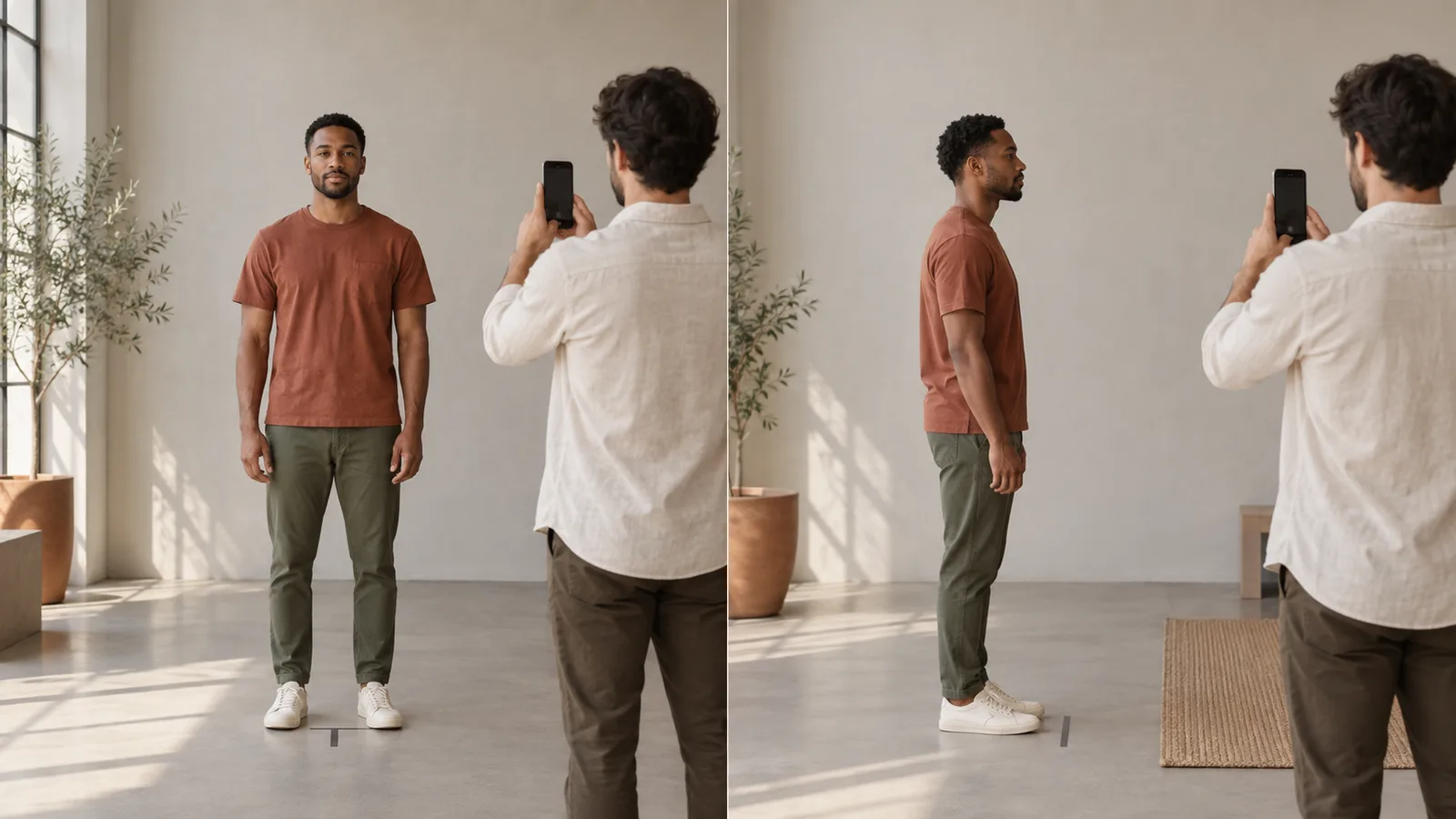
Check 2 is context. Use a neutral wall and crop out mail, work badges, house numbers, family photographs, computer screens and other people. A face photo may reveal more than the face: location clues, routines, relationships and possessions can sit in the background. Take a fresh, purpose-built portrait instead of uploading an old social image with embedded context. Do not submit another person's face without their informed agreement.
Good minimization can also improve the analysis. One front portrait and one profile at eye level, in even light, with a relaxed expression, are easier to compare than a folder of inconsistent selfies. Keep filters off and avoid extreme wide-angle distance. The goal is not to create a flattering identity photo; it is to provide only the visual evidence needed for a limited, explained request.
Checks 3 and 4: separate device permission from consent to processing
Check 3 is the operating-system permission. Camera access allows an app to capture an image; photo-library access may allow you to choose an existing one. Neither permission, by itself, explains whether a selected image stays on the device or travels to a server. Prefer limited photo access when the operating system offers it, and grant a permission when you use the feature rather than automatically approving a broad request during onboarding.
Check 4 is the processing disclosure. Look for a plain description of what is sent, which function receives it and what comes back. On-device face detection, a temporary server upload and a saved cloud report are different operations with different consequences. A useful disclosure distinguishes them. Do not assume that a camera permission means local-only processing, or that declining full-library access prevents a chosen portrait from being uploaded after you select it.
Apple explains that App Store privacy details are intended to show data types an app and its third-party partners may collect, how the data is used, and whether it is linked to the user or used for tracking. Treat that label as a structured starting point, not a complete contract. Compare it with the developer's current privacy policy and the disclosure shown immediately before the feature sends a photo.
After using the feature, revisit device settings. Remove camera or photo access if you do not expect to use it again soon. This does not delete information already transmitted, but it reduces future access. If the app stops functioning when an unrelated permission is denied, ask whether the requested access is truly necessary. A clear app should connect each sensitive permission to a visible user action.
Checks 5 and 6: identify every processor and a believable retention window
Check 5 is the recipient chain. Many AI features involve more than the visible app developer: cloud storage, authentication, an AI model provider, image generation and crash monitoring may be separate services. The current policy should name the relevant categories or companies, explain why they receive data and distinguish face photos from subscription or diagnostic information. ‘We use trusted partners’ is less informative than a specific processing map.
Ask whether photos or derived measurements are used to train models, personalize advertising, track activity across services or identify people. Do not infer an answer from words such as secure, anonymous or AI-powered. A photo can be processed without facial recognition, while facial measurements may still be personal data. The policy should describe the actual purpose and limitations rather than relying on reassuring labels.
Check 6 is retention. Look for separate periods for raw uploads, generated images, provider logs, saved reports and account records. ‘We delete photos after processing’ is incomplete if a processor keeps request logs or if a saved report remains in a cloud account. A believable schedule tells you when deletion is triggered, whether cleanup adds delay and which limited legal or security exceptions may apply.
Read the date at the top of the policy and keep a copy or screenshot of the terms that informed your choice if the upload matters to you. Compare the privacy policy with the store label and in-app disclosure. When they conflict, do not select the most favorable sentence. Ask the developer to reconcile the difference and wait for a clear response before sending a new portrait.

Checks 7 and 8: find withdrawal, item deletion and account deletion
Check 7 is control after consent. Find out where to stop future AI processing and whether that choice applies to every feature or only one category. Withdrawing consent may prevent new transfers without reversing a completed request, so the timing matters. Look for an in-app control and an alternative contact route in case you lose account access. A button that merely hides a result on your device may not remove a server record.
Check 8 is deletion at three levels: the individual analysis, generated previews and the account itself. Confirm what each action removes, how long completion takes and whether uninstalling the app is treated differently from deleting an account. If you saved a report, decide whether you still need it. Keeping every experimental portrait indefinitely produces little planning value and makes later cleanup harder.
Create a simple review habit. After the output appears, save only the small number of observations that support your decision, such as ‘compare two haircut directions’ or ‘repeat photos in six weeks.’ Then delete redundant exports and local duplicates. Use the developer's stated controls for hosted data; deleting a copy from the camera roll cannot reach a server, while deleting an online item cannot remove a screenshot you shared elsewhere.
Keep confirmation messages for material deletion requests and follow up if the promised window passes. Privacy rights differ by location, and this guide is not legal advice, but a legitimate service should provide a workable contact method. Never send another face photo in an email simply to prove which account is yours unless support gives a justified, secure verification path.
Check 9: decide whether the expected benefit justifies the upload
The final check is proportionality. Define one real decision before you upload: choosing a haircut direction, comparing beard balance, improving a photo setup or selecting two controllable priorities. If the expected output is only a novelty score, the privacy cost may not be worth it. A number cannot establish objective attractiveness, health, identity or personal worth, and repeated scanning can turn ordinary photo variation into unnecessary concern.
For an app-assisted workflow, take clear front and profile photos only after the privacy checks pass. Read the explained observations, ignore unsupported certainty and select a small number of reversible actions. Give each action a realistic time window, then compare under the same light, lens, distance and expression. The earlier guide on why a FaceScore changes explains why uncontrolled photos should not be treated as evidence of progress.
MogRise can support that sequence by connecting selected photos with an explained analysis and a focused plan. That does not replace your judgment. Skip a recommendation that is unsafe, medically framed without qualification, financially disproportionate or inconsistent with your life. For skin, hair-loss, jaw-function or mental-health concerns, use an appropriate qualified professional rather than asking an appearance app to diagnose a condition.
Avoid uploading while distressed or chasing reassurance. Set a stop rule before you begin: one baseline, one review, and no immediate rescans because you dislike a number. A useful app session ends with a practical decision outside the app. If it instead makes you feel compelled to submit more images, pause, remove access and return to the limited question you originally wanted to solve.
A repeatable privacy check for every new face-analysis feature
Repeat the nine checks when an app adds a new feature, changes provider, requests a new permission or updates its policy. Previous consent to a face score does not automatically answer whether you want an AI hairstyle preview, profile-photo comparison or other generation feature. Different outputs can involve different photos, processors and retention paths. Treat each meaningful purpose as a new decision rather than a permanent blank cheque.
The practical standard is clarity before transfer and control afterward. Send the minimum necessary portrait, keep the background neutral, limit device permissions, understand who processes the file, record the stated retention, know how to stop future processing and locate deletion controls. Then decide whether the result helps with a defined, reversible action. That sequence keeps privacy connected to the real purpose of using the tool.
LooksMax app privacy is therefore not a badge you accept once. It is a short decision process you can repeat. When the current label, policy and in-app disclosure agree, the requested input is proportionate and the controls are usable, you can make an informed choice. When any essential answer is missing, waiting is a complete and reasonable decision.